Personal projects
My kids talk to the wall now
A small screen in the hallway that tells us when the bus is coming, plays twenty questions, and runs spelling practice. It was much easier to build than it looks.
There is a small screen on our hallway wall. Behind it is a Raspberry Pi, which is a computer the size of a credit card that costs less than a nice dinner.
Most of the day it tells us when the bus is coming. The rest of the time my children stand in front of it and shout at an iPhone.
They call it Pluto. So do I now. It's gone too far to stop.
Pluto was already up on our wall when Apple released HomeView. I did a double take. I'd built my own little version of the same idea: a screen for the house that you could talk to through Siri.
Mostly, it's a bus timetable
The idea started with Bus Aunty, an e-ink display for checking bus arrivals at home. I wanted to build one for our hallway. Then I started thinking about what else it could do, and that's how we ended up with spelling practice and guessing games on the wall.
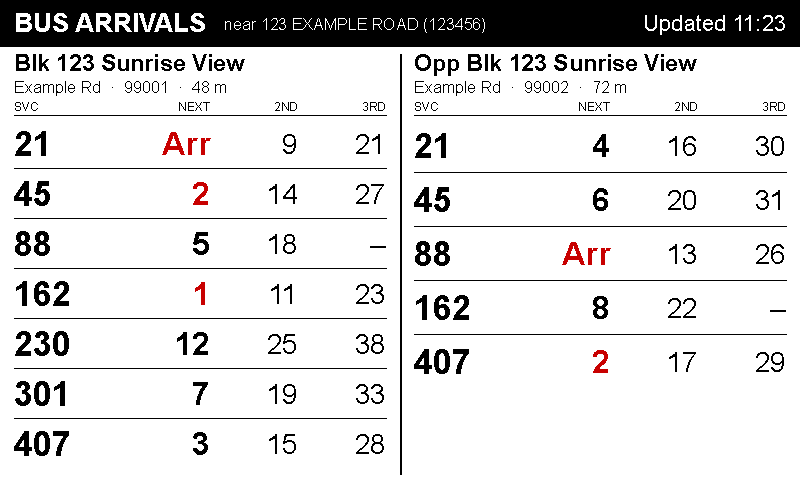
It shows the next three buses at each of our two nearest stops.
The screen can only do three colours: black, white and red. So on the bus view, red got exactly one job: a bus that's arriving right now. Nothing else there is ever red.
Which means you can read it from the far end of the corridor with one shoe on. That's the whole thing. That's the product.
Honestly, if it only did this, it would already have been worth the weekend.
Why it's called Pluto
The first version answered to "Hey Siri, answer my question."
It worked about half the time, which in a hallway at 7:05am is zero percent. It turns out five-year-olds don't say phrases. They say words. Loudly. Once.
So I gave the thing a name. "Ask Pluto." Two syllables, easy to shout, and it doesn't sound like anything else.
It worked immediately. Weeks of fiddling, and the single best improvement was picking a better name. I think about this more than I'd like to.
It keeps its own menu
Nobody remembers what you can say to a thing like this. So I ask, "What can Pluto do?" and it shows me the menu.
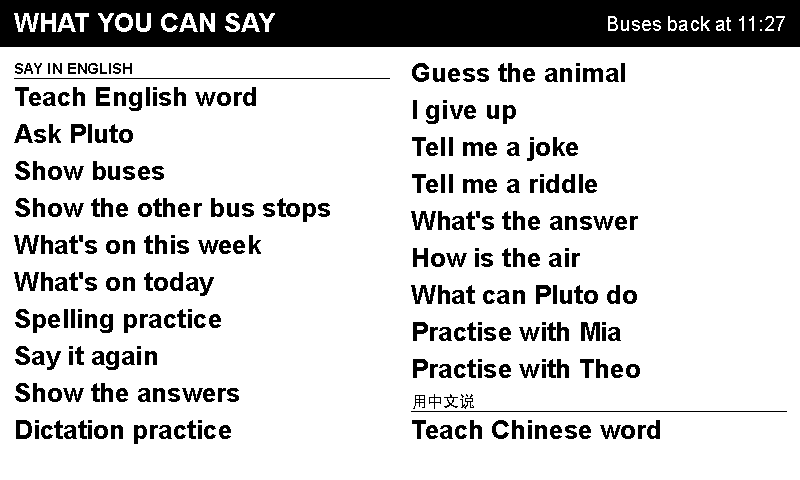
I don't maintain that list. It builds itself from whatever's actually switched on, so it can't go out of date and it never offers you something that's broken.
Look at the top right: Buses back at 11:27. Every time the screen shows something else, it tells you when the buses come back. My daughter asked for that in the first week and she was completely right. A screen that changes without telling you when it'll change back is a screen you stop trusting.
"What does reinforce mean?"
Say "Teach English word", say the word, and it puts it on the wall in both languages for five minutes:
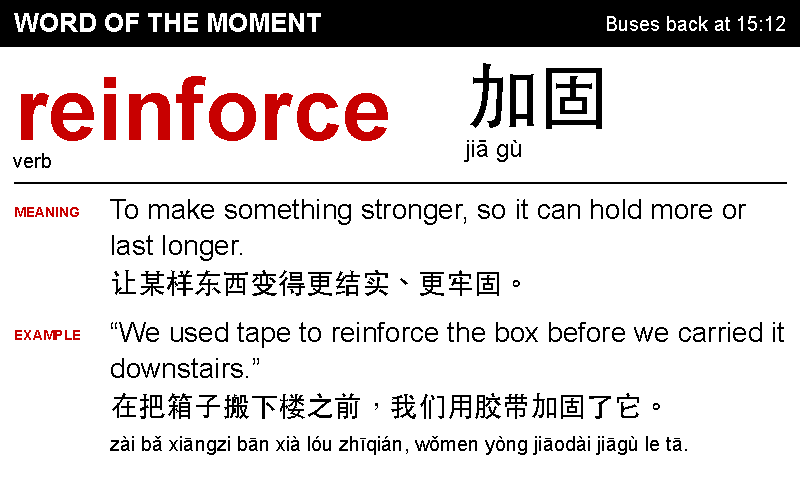
There's a "Teach Chinese word" too. Say a Chinese word and it goes up in big red letters, with the English alongside.
Two things I didn't expect. First, five minutes is the right length: long enough that someone walks past and reads it again, short enough that it's gone before it becomes wallpaper. Second, the example sentence does most of the work. A definition is abstract. A sentence about taping up a box before you carry it downstairs is a thing a child can picture.
My daughter now asks for words purely to see them in red. I'll take it.
Twenty questions, with no screen at all
Say "guess the animal" and it picks one. The kids ask yes/no questions and get back exactly one of three words: "Yes." "No." "Sometimes."
That's the whole game. The screen stays asleep until the end, when it wakes up to show what it was:
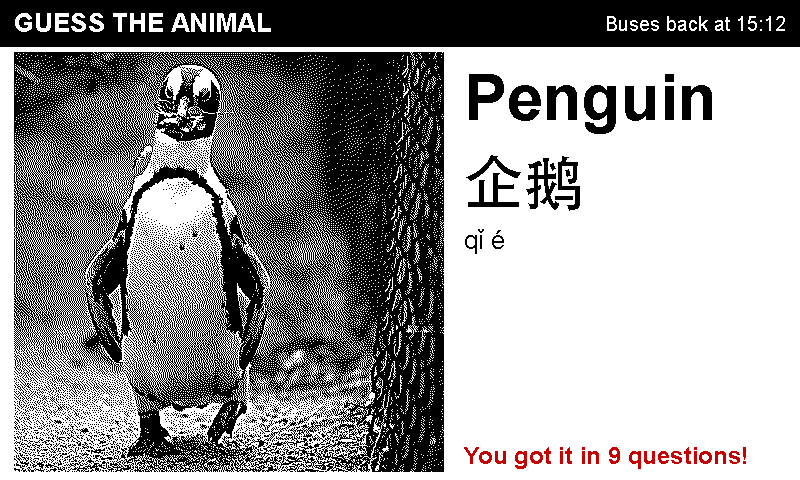
Yes, it was a penguin. It is often a penguin.
And it's better this way. With nothing to stare at they look at each other instead, and then spend ten minutes arguing about whether a penguin counts as a bird. I did not design that part. It's the best part.
Spelling practice, on paper
My favourite problem: Siri cannot hear a spelling. Say "B-E-A-R" and it writes down bear. Say it slower. Still bear. Say it angrily. Still bear.
So we gave up and did it the old way. It reads the word, then a sentence, then the word again, exactly how a teacher does it, while my daughter writes on actual paper. Then a second command puts the answers up to mark against:
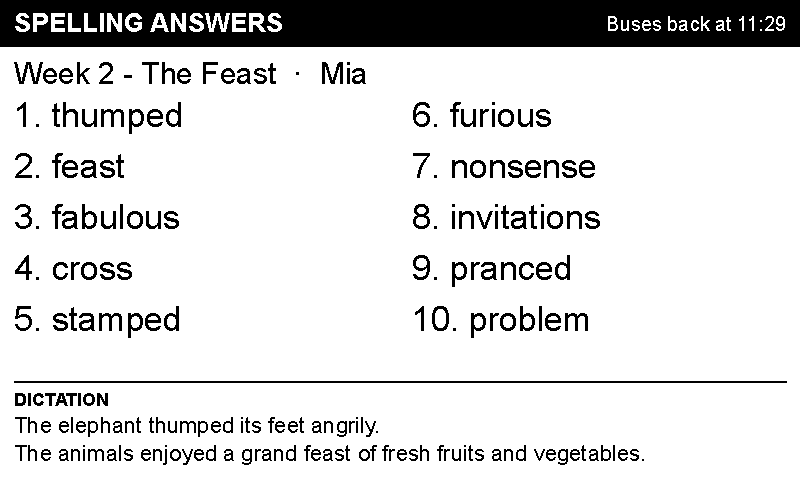
It uses her school's real list, typed in by hand. My son is five and the booklet is for seven-year-olds, so he gets five short words instead of ten long ones.
Ten minutes, no screen time, no app, no subscription. She actually likes it, which I did not see coming.
Two numbers, both right, totally disagreeing
The haze card was supposed to be the easy one. Then this turned up:
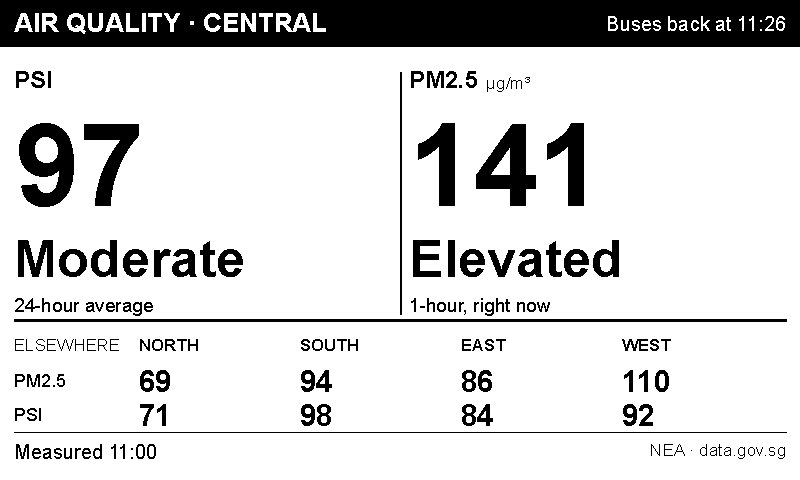
One reading says Moderate. The other, same place, same minute, says Elevated. Both are right. One is a 24-hour average, and the other tells you what the air is like right now. Spread a hazy afternoon across a whole day and it looks like a lovely day.
So it shows both, with the official wording for each, and the rest of the island underneath so you can tell "it's hazy" from "it's hazy here".
That's the one that earns its keep on a bad week.
How it actually works
This is the part people ask about, so here it is properly. It's simpler than it sounds. There are only three moving pieces.
The shape of it

The three pieces
1. The Pi and the panel. I use a Raspberry Pi Zero 2 W with an e-ink display board that presses straight onto its pins. No soldering. The software is plain Python drawing images with Pillow, running as a background service that starts itself on boot. It redraws the bus view every minute.
I had a wooden photo frame made to fit the screen and the Pi. I asked the person at the frame shop to drill a hole in the side for the micro-USB cable.
I could have 3D-printed a case, but I couldn't justify buying a printer just for this.
2. A tiny web server. The Pi runs a small HTTP API on the home network, on port 8080. Each thing it can do is one address: /bus, /ask, /help, /animal, /spelling, and so on. You can literally open http://eink.local:8080/health in Safari on your phone and watch it answer. That was the first thing I built, and being able to poke it from a browser made everything after it easy.
3. Shortcuts on the phone. This is the Siri connection, and it's the bit that surprises people: there is no Siri integration to write. Apple's Shortcuts app can make a web request and speak the result, and the name you give a Shortcut becomes the Siri phrase. Name it "Show buses" and "Hey Siri, show buses" now works. That's it. That's the whole trick.
What one command actually does
Take "Hey Siri, ask Pluto":
- Siri matches the phrase to a Shortcut of that name.
- The Shortcut listens for the question and captures it as text.
- It sends the text to the Pi with a
POSTrequest tohttp://eink.local:8080/ask. A secret token in the header lets the Pi check that the request came from one of our devices. - The Pi does the work: checks the question is suitable, looks things up, writes a short answer, and draws it on the wall.
- The Pi replies with a little bundle of data containing the exact sentence to say.
- The Shortcut takes that sentence and speaks it.
The important detail is step 5. The Pi writes the words. Siri just reads them out. Siri is a microphone and a speaker, nothing more. Everything that decides what gets said happens on a computer I own, in my house. That’s exactly what I wanted for something my children talk to unsupervised.
The HomePod bit, including what doesn't work
A HomePod can run Shortcuts too, which is how most of this works from the kitchen with nobody holding a phone.
But not all of it. If a command needs you to say something extra after the phrase, like a question or a guess, it has to run from a phone or iPad. Our children don't have Apple IDs of their own, so for them those commands simply don't happen at the kitchen speaker.
| Say this | Works at the HomePod? |
|---|---|
| Show buses | Yes |
| How is the air | Yes |
| What's on this week | Yes |
| Spelling practice | Yes |
| Tell me a riddle | Yes |
| Ask Pluto | No, it needs a question |
| Teach English word | No, it needs a word |
| Guess the animal | No, it needs your guesses |
Once I spotted that pattern, I leaned into it and made the everyday commands need no extra words at all. "Practise with Mia" carries the name inside the phrase itself, so nobody has to say it separately afterwards. That one decision is why most of it works from the kitchen counter, hands full, nobody signed in to anything.
What it talks to
Buses come from the national transport data feed. Air readings come from the environment agency's open data. We use Apple Calendar for the family calendar. Siri already adds events to it perfectly well, so I left that bit alone. Jokes and riddles are a plain text file. Only the word cards and the Q&A use an AI model at all.
And none of it is on the internet. The Pi has no open ports to the outside world. It sits on the home Wi-Fi, and if it wants an update it goes and fetches one itself.
You could absolutely build this
That's really why I'm writing this.
A Raspberry Pi, a screen that presses onto it, and some Shortcuts you name carefully. No cloud account, no subscription, no smart home ecosystem to buy into. Most of the data is free and public. The hardest part was deciding what to put on the wall, not building it.
Start with one thing. Pick a question your household asks out loud every day and put the answer where everyone walks past. In our house it was "Has the bus gone?" You'll know within a week whether anyone looks at it.
Ours now does nine things. But mostly it just says when the bus is coming, and honestly, that was always the point.
Screenshots are real output from the panel, with stand-in names, bus numbers and an address. The penguin is a CC0 photograph by Stanislav Stelmakhovich via Wikimedia Commons, dithered down to black and white so the panel can draw it.